Vertical and horizontal Blocks Alignment with jQuery
- 13 June 2014
- Roman Baluk
- Layout coding
- 6602

Sometimes when coding a website, front-end developers use jQuery if CSS doesn't fulfill their needs. There can be many reasons for this, one of them is simply Cross-Browser. Today, I'm going to tell you how to make vertical and horizontal alignment of the blocks to their parent elements.
Align a block to its parent
Supposing that we need to vertically and horizontally align child blocks (they may be of different size) that are inside their parent blocks.
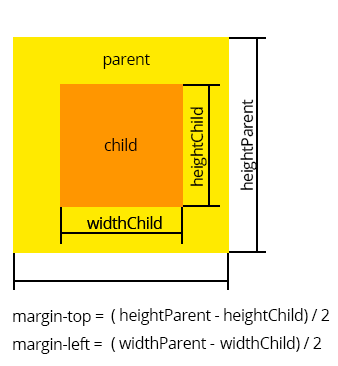
Example
$(".child").each(function(){ //Indicate that child block has to be aligned and iterate all child blocks in the .each method.
        var heightChild = $(this).height(), // Child element height
            widthChild = $(this).width(), // Child element width
            heightParent = $(this).parent().height(), // Parent element height
            widthParent = $(this).parent().width(); // Parent element width
        this.style.marginTop = (heightParent - heightChild) / 2 + "px";  // This equation results in the margin that moves the child block where necessary
        this.style.marginLeft = (widthParent  - widthChild) / 2 + "px";
    });
As a result, all img images have been vertically and horizontally aligned to their parent blocks.


